Tuesday, October 28, 2014

The A Team for Web Portal Consultancy

Can you imagine how difficult for you to convince the client that you have got the strong team to support their big tasks in constructing a web portal?

Here comes the list of roles to be involved in Web Portal Consultancy team:

Digital Strategist:

Digital strategy was the discipline of working with teams inside the agency and/or directly with the brand to solve complex business and marketing problems.
Digital strategists are the people that lead the problem solving charge and help connect the dots between business, brand, and marketing goals and the channels, tactics and technologies that’ll make it all come together to provide actionable results. Competent digital strategists work in a highly focused manner with the client and/or agency business unit to get a clear and detailed understanding of what the challenges are from a business point-of-view [like a business analyst would]. Of course, at any given time during the engagement, you can swap out “business” with “creative”, “technology”, etc. Same strategic approach, different lens.

Web Technical Architect:

The Technical Architect is responsible for the overall technical design and build of the custom elements of the solution. The Technical Architect works as a team member along with the Engagement Manager, Developer and Solutions Architect to deliver the complete solution for the customer. This role must be organized and analytical, adept at working in a team environment, able to design and implement a project schedule, and able to handle multiple priorities.

Web Information Architect:

Information architects organize the content of web sites, intranets and online communities in a user-friendly way that allows visitors to quickly find what they're searching for. They then create interfaces to support that organization. Information architects begin by analyzing the target audience and level of interactivity, and technology required, in addition to the data presented through the site. They then develop a plan that will balance efficiency with ease-of-use. Information architects work with graphic and web designers, database engineers and coders to implement their plans.

Web Business Analyst:

Web Business Analyst will act as primary, working with clients and agency partners in helping plan, document and consult on new projects. In addition, the Web Business Analyst will act as a technical resource assisting the client team with presales and estimates, along with serving as the gateway to the development team; interfacing with production, operations and Sr. Management.

Web Designer:

Web designers plan, create and code web pages, using both non-technical and technical skills to produce websites that fit the customer's requirements. They are involved in the technical and graphical aspects of pages, producing not just the look of the website but determining how it works as well. Web designers might also be responsible for the maintenance of an existing site.

Web Developer:

Similar to Web designer, Web developer is a more specialist role, focusing on the back-end development of a website and will incorporate, among other things, the creation of highly complex search functions.

Web Tester:

Web Tester help testing web application user interface and mobile applications. User Interface testing includes verification against Visual Design specifications and the usability assessment. The tester has to assure that the web application UI conforms to the requirements, and report a defect when it doesn't.

Web Design Quality Assurance:

Web Design Quality Assurance ensure the website adheres to the Web Design Guidelines like HTML standards, CSS standards, W3C standards, Accessibility standards, Performance and Cross Browser Compatability.

Web Development Quality Assurance:

Web Development and QA Specialist ensures the web assets are operationally sound and perform in accordance with the organization’s technical standards, including reviewing and analyzing the site, and all the systems that provide a public interface, for issues of quality and infrastructure performance. They are responsible for the design, development and implementation of new system functionality for the website as required and the design of quality assurance procedures for all stages of the system process change, and coordinating a change control process for implementing technical and other updates in a timely and non-disruptive manner.

Web Portal vs Web Site

One day the management were discussing about setting up new features to the business website in order to allow more collaborations among the staff, it reminded me the theory that I've learnt the old days about the difference between a website and a web portal.

To sum it up, the following table is extracted:


Monday, October 27, 2014

Agenda of Phase 2 clinical trial of experimental Ebola vaccines

Just heard from the news that two American nurses have been declared cured of Ebola.


Two candidate vaccines have been elected for phase 1 clinical trials.

  • One (cAd3-ZEBOV) has been developed by GlaxoSmithKline in collaboration with the US National Institute of Allergy and Infectious Diseases. It uses a chimpanzee-derived adenovirus vector with an Ebola virus gene inserted.
  • The second (rVSV-ZEBOV) was developed by the Public Health Agency of Canada in Winnipeg. The license for commercialization of the Canadian vaccine is held by an American company, the NewLink Genetics company, located in Ames, Iowa. The vaccine uses an attenuated or weakened vesicular stomatitis virus, a pathogen found in livestock; one of its genes has been replaced by an Ebola virus gene.
The efficacy of those drugs are not completely understood. Gender and race difference may contribute a factor to the drug effect.

WHO has set the key milestones on the agenda in a short time frame:

October 2014:
Mechanisms for evaluating and sharing data in real time must be prepared and agreed upon and the remainder of the phase 1 trials must be started

October–November 2014:
Agreed common protocols (including for phase 2 studies) across different sites must be developed

October–November 2014:
Preparation of sites in affected countries for phase 2 b should start as soon as possible

November–December 2014:
Initial safety data from phase 1 trials will be available

January 2015:
GMP (Good Manufacturing Practices) grade vaccine doses will be available for phase 2 as soon as possible

January–February 2015:
Phase 2 studies to be approved and initiated in affected and non-affected countries (as appropriate)

As soon as possible after data on efficacy become available:
Planning for large-scale vaccination, including systems for vaccine financing, allocation, and use.

As of 25 October 2014, the number of confirmed cases reaches over 10,000 across the countries.
Ref: http://apps.who.int/iris/bitstream/10665/137185/1/roadmapupdate25Oct14_eng.pdf?ua=1

The effect of outbreak control still remains unknown in the world unless a new vaccine is invented and proven to be effective to all races.


Friday, October 24, 2014

Kylin - Next Gen Open Source OLAP Engine for Big Data

Just come across the news that eBay has released to the open-source community their distributed analytics engine: Kylin (http://kylin.io). It doesn't just make it open for the core code base, but also Shell Client, RPC Server, Jobs Scheduler and relevant tools. What it means is that a whole set of tools for SQL interface and multi-dimensional analysis (OLAP) is available for free on Hadoop to support extremely large datasets.

Regarding query latency, Kylin has claimed to reduce it on Hadoop for 10+ billion rows of data down to sub-second level (better than Hive queries for the same dataset). As compared with Kylin, mainstream OSDDMS like Cassandra (SEDA-based architecture) has to let a request to hop between multiple threadpools during processing, increasing latency. Nonetheless, it can still be fixed by including lightweight threads like Kilim, a more-efficient executor service, or a new approach entirely.

For standard compatibility, Kylin supports most ANSI SQL query functions in its ANSI SQL on Hadoop interface.

Kylin also has the seamless integration with BI Tools like Tableau and other third-party applications.

With nice feature like MOLAP cube query, Kylin let users define a data model and then pre-build within itself to support more than 10+ billions of raw data records.

Apart from MOLAP, the next generation of Kylin will provide hybrid OLAP (HOLAP) to combine real-time/near-real-time and historical results for business decisions by offering a single entry point for front-end queries.

Furthermore, Kylin provides compression and encoding to reduce storage.

The business units in eBay have been putting Kylin in production for some time. They have carried out the analysis of 12+ billion source records generating 14+ TB cubes. Its 90% query latency is less than 5 seconds, without using Hive query or Shell command.

Slideshow: http://slidesha.re/1wilDxC

News release: http://www.ebaytechblog.com/2014/10/20/announcing-kylin-extreme-olap-engine-for-big-data/#.VEnOb4uUcQ7


Friday, October 3, 2014

Installing Composer on OS X Mavericks with XAMPP for Mac installed

Composer is a popular tool for the dependency management in PHP. It lets you declare dependent libraries for each particular project.

Let's have a quick look on what have installed so far on the development machine:

OS X Mavericks
XAMPP for Mac installed and configured properly (A running instance)
Hombrew installed and configured (Try brew doctor to tackle any problem before you start)

Steps as follows:

Assuming default installation path of XAMPP for Mac package installed as usual, please change into the directory where PHP executable resides:
$ cd /Applications/XAMPP/bin/


Check the version of PHP:

$ php --version
PHP 5.4.30 (cli) (built: Jul 29 2014 23:43:29) 
Copyright (c) 1997-2014 The PHP Group
Zend Engine v2.4.0, Copyright (c) 1998-2014 Zend Technologies

Now we know PHP version is 5.4. Let's remember this for use in next couple of steps.

If you try to install Composer with brew command now, you may end up with an error like this:
composer: Missing PHP53, PHP54, PHP55 or PHP56 from homebrew-php. Please install one of them before continuing
Error: An unsatisfied requirement failed this build.

The likely cause is that we are using PHP within XAMPP package whereas brew cannot detect its presence without installing its own PHP engine.
Supposing XAMPP package is installed properly, we can simply add the path /Applications/XAMPP/bin/ to $PATH environment variable to the end of the file ~/.bash_profile . If it doesn't work then another to get around this would be installing a new version of PHP package using brew command.

[OPTIONAL] So which version of brew's PHP engine to install? It's better match the version of PHP within XAMPP, i.e., 5.5.

[OPTIONAL] Let's install PHP54 package by using brew command:
$ brew install php55

Once finished, start installing Composer with brew commands like these:
$brew update;brew tap homebrew/dupes;brew tap homebrew/php;brew install composer

It includes the actions of updating and tapping the right repository for downloading Composer's source.

When brew's package for Composer is installed successfully, we can carry out next step to create composer.phar file within XAMPP's bin directory.

$ sudo php -r "eval('?>'.file_get_contents('https://getcomposer.org/installer'));"

We must execute the command as root privilege to avoid permission denied error.

When done, we can try composer command within /Applications/XAMPP/bin/ directory.
$ php composer.phar
   ______
  / ____/___  ____ ___  ____  ____  ________  _____
 / /   / __ \/ __ `__ \/ __ \/ __ \/ ___/ _ \/ ___/
/ /___/ /_/ / / / / / / /_/ / /_/ (__  )  __/ /
\____/\____/_/ /_/ /_/ .___/\____/____/\___/_/
                    /_/
Composer version 1e4229e22aefe50582734964d027fc1bfec16b1d 2014-10-02 11:34:17

Usage:
  [options] command [arguments]...


Then it should be ready for us to checkout new dependent packages within a new or existing PHP project directory.


Monday, July 21, 2014

Heartbleed Bug Revisited


Although there have been lots of news and blogs discussing about Heartbleed bug which has been around for almost two years, I would like to recall myself about what was happening.


Here're some facts from Wiki:
  • Heartbleed is a security bug in the OpenSSL cryptography library. OpenSSL is a widely used implementation of the Transport Layer Security (TLS) protocol. 
  • Heartbleed may be exploited whether the party using a vulnerable OpenSSL instance for TLS is a server or a client. 
  • Heartbleed results from improper input validation (due to a missing bounds check) in the implementation of the TLS heartbeat extension, the heartbeat being the basis for the bug's name.
  • The vulnerability is classified as a buffer over-read, a situation where software allows more data to be read than should be allowed.
  • Heartbleed is registered in the Common Vulnerabilities and Exposures system as CVE-2014-0160.
  • The federal Canadian Cyber Incident Response Centre issued a security bulletin advising system administrators about the bug.
  • A fixed version of OpenSSL was released on April 7, 2014, on the same day Heartbleed was publicly disclosed.


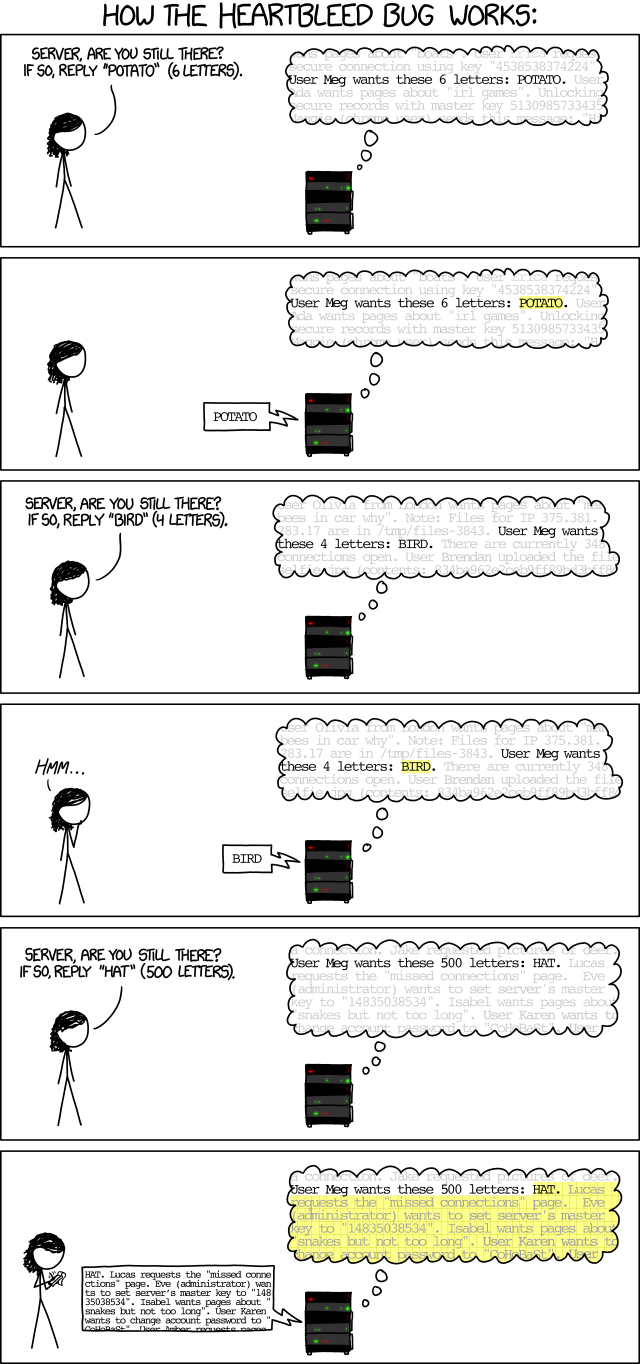
Regarding how Heartbleed vulnerability can be exploited, the below comic is found to be well explaining to itself. (Reference)


Heartbleed bug would affect Web servers which aim to provide secured HTTPS connection (port 443) to the clients. As the above comic explains, the web server seems to answer too much to the attacker who asks for longer response (500 letters) than the one she actually inputs ('HAT' 3 letters). Any letters beyond the first 3 letters becomes a bonus to the attacker who might actively record extra details she received at the other side. They could be random information like username, password, security log or any piece of information that helps a hacker to infiltrate into the vulnerable server.

Because it looks like a normal access to the web site between the client and the server, there is no log entry which might raise the alert of the system admin in order to figure out what's happening at the server side. The system admin would simply think the web server is providing secured service, with no knowing of people outside playing dirty tricks at all. In such case, a hacker with enough patience and basic probing skills could possibly compromise the web services. In other words, it might happen when he collects enough login information to disguise himself as a legitimate user.

A real world example is the vulnerable server would possibly respond to the attacker with up to 64 kilobytes of arbitrary data from the memory.

Although OpenSSH service (port 22) makes use of OpenSSL library, it is less likely to be affected.

Linux distros like Ubuntu and Linux Mint have a patch on OpenSSL library, so it's recommended people should check whether the actual built date of the library is after 7th Apr 2014 in order to insure a patch is applied properly.

Sample command to check OpenSSL library would be like this:

$ openssl version -a
OpenSSL 1.0.1f 6 Jan 2014
built on: Fri Jun 20 18:53:23 UTC 2014
platform: debian-i386
options:  bn(64,32) rc4(8x,mmx) des(ptr,risc1,16,long) blowfish(idx) 
compiler: cc -fPIC -DOPENSSL_PIC -DOPENSSL_THREADS -D_REENTRANT -DDSO_DLFCN -DHAVE_DLFCN_H -DL_ENDIAN -DTERMIO -g -O2 -fstack-protector --param=ssp-buffer-size=4 -Wformat -Werror=format-security -D_FORTIFY_SOURCE=2 -Wl,-Bsymbolic-functions -Wl,-z,relro -Wa,--noexecstack -Wall -DOPENSSL_BN_ASM_PART_WORDS -DOPENSSL_IA32_SSE2 -DOPENSSL_BN_ASM_MONT -DOPENSSL_BN_ASM_GF2m -DSHA1_ASM -DSHA256_ASM -DSHA512_ASM -DMD5_ASM -DRMD160_ASM -DAES_ASM -DVPAES_ASM -DWHIRLPOOL_ASM -DGHASH_ASM
OPENSSLDIR: "/usr/lib/ssl"


Useful tool like nmap can be used to check the target server.

Example Usage:


nmap -p 443 --script ssl-heartbleed


Script Output:

PORT    STATE SERVICE
443/tcp open  https
| ssl-heartbleed:
|   VULNERABLE:
|   The Heartbleed Bug is a serious vulnerability in the popular OpenSSL cryptographic software library. It allows for stealing information intended to be protected by SSL/TLS encryption.
|     State: VULNERABLE
|     Risk factor: High
|     Description:
|       OpenSSL versions 1.0.1 and 1.0.2-beta releases (including 1.0.1f and 1.0.2-beta1) of OpenSSL are affected by the Heartbleed bug. The bug allows for reading memory of systems protected by the vulnerable OpenSSL versions and could allow for disclosure of otherwise encrypted confidential information as well as the encryption keys themselves.
|
|     References:
|       https://cve.mitre.org/cgi-bin/cvename.cgi?name=CVE-2014-0160
|       http://www.openssl.org/news/secadv_20140407.txt
|_      http://cvedetails.com/cve/2014-0160/


Wednesday, May 21, 2014

Installing VMware vSphere Client 4.1 U3 on Windows Server 2012 R2

VMware vSphere Client 4.1 is not supported by Windows Server 2012 R2. This software was invented during WinXP regime and becomes not quite compatible with nowadays versions of Windows. Still, there are a few tricks to make it work again. I tested it on Windows 2012 R2 platform while it might be working on Windows 8 as well.

Before we proceed, we need to make sure that VMware ESXi platform has been installed properly on the target machine with a known IP address. This will lead to the next step of the installation process.

For the direct download of vSphere Client v4.1, please access the frontpage of your ESXi web management console via web browser (with URL like https://IP.TO.ESXI.MACHINE) and click on the hyperlink of Download vSphere Client. This makes sure that we have got the version of vSphere Client compatible with the actual ESXi environment we are managing.

The installation file will be named with something like: VMware-viclient-all-4.1.0-???????.exe

Assuming the file has been downloaded to a folder C:\Downloads\, we need to process it before use.

A little pre-requisite for vSphere Client is J# redistributable package which can downloaded via:

First, run the J# package to install so as to make Windows server meet the installation requirements. We can skip it if we already have the package installed or we may let vSphere Client installation file to deal with this.

Before the actual installation of vSphere Client V4.1, it is necessary to set some options on the installation file itself.

Right-click on the installation executable and select Properties. 

Under Compatibility tab, check the following checkboxes:

  • Run this program in compatibility mode for Windows 7
  • Run this program as an administrator

Double-click on the installation executable like VMware-viclient-all-4.1.0-???????.exe and it should run through the whole process successfully. 

After all, the icon of vSphere Client will appear on Windows Desktop.


Tuesday, April 29, 2014

Setup MySQL ODBC Driver for XAMPP on OS X Mavericks

This article is mainly for the setup of MySQL ODBC connection used in Apache server in OS X Mavericks. Of course, you can try it on OS X Lion or Mountain Lion as well.

Since Mac OS X 10.9 has been released, I have been searching for the way to revive the nearly forgotten feature of ODBC connection. As OS X is based on UNIX system, unixODBC is the first thing in mind for bridging the gap between various database products and the Mac world. Unfortunately, it is still too early to have a piece of working copy available for OS X 10.9.

As I don't remember wrong, it's a painful experience to implement a working ODBC setup on OS X platform. It's crucial to choose the right product among various combination of 32 bit and 64 bit drivers available yet we don't know which one will be working on the newest platform.

Here's the quick receipt which should work on OS X Mavericks:

Assuming we are using a lazy bundle of XAMPP for OS X package which in theory contains Apache (32 bit) and MySQL (32 bit). Since OS X is 64 bit platform which is able to run 32 bit applications, it is still safe to download a copy of 32 bit ODBC driver for use.

A recent version of MySQL connector ODBC should do the job. As of writing, it's version 5.3.2.
http://dev.mysql.com/get/Downloads/Connector-ODBC/5.3/mysql-connector-odbc-5.3.2-osx10.7-x86-32bit.dmg

OS X 10.9 doesn't provide ODBC Administrator in Utilities anymore. For GUI configuration, I go for the solution of ODBC manager:
http://odbcmanager.net/downloads/ODBC_Manager.dmg

Once we finish both of the software installations, we can start digging with Terminal commands.

In Terminal, we can can have a quick access to where ODBC configuration files are hiding under the tree of Filesystem.

The ODBC files should be located as follows:

System wide configurations:
/Libaray/ODBC/odbc.ini
/Libaray/ODBC/odbcinst.ini

These files are supposed to be empty or kept in basic information. They need further modification to get our ODBC connection working.
 Unfortunately, MySQL Connector has default installation of configuration files in user specific folder. It also creates two sample ODBC connections at the beginning of installation.

User specific configurations:
~/Libaray/ODBC/odbc.ini
~/Libaray/ODBC/odbcinst.ini

Now, we need to migrate the settings from user specific location to system wide location.

Two simple steps to get the job done:

Cut the content from ~/Libaray/ODBC/odbc.ini and paste it into /Libaray/ODBC/odbc.ini.

Cut the content from ~/Libaray/ODBC/odbcinst.ini and paste it into /Libaray/ODBC/odbcinst.ini.

Of course, you need to merge the content for the files so they contain unique section for each.

Remember to save the empty content back in ~/Library/ODBC/odbc.ini and ~/Library/ODBC/odbcinst.ini in order to eliminate any duplicate entries to be shown on ODBC Manager.

Open ODBC Manager and have a look if MySQL ODBC 5.3 ANSI Driver exist. We'll make use of this driver to create System DSN for

 Click Add... button in System DSN Tab and add the basic connection parameters:

For Apache's ODBC configuration, please have a look at here for more information:
http://httpd.apache.org/docs/2.4/mod/mod_dbd.html

It takes a little bit longer period of time to get MySQL ODBC drivers ready for mod_dbd since OS X 10.8. Now it's working.


Friday, February 21, 2014

To get rid of Firewall warning for particular application in Mac OS X Mavericks

Each time we open up an application which attempts to open a network connection in OS X, a firewall warning will always pop-up (in case you don't turn your firwall off) to ask for action like allowing a connection to be opened.

This might be annoying when you open your favourite app and get blocked by this warning everyday. The reason would be clear when you type the following command in Terminal for a check:

$
$ codesign -dvvvv /path to/your application


You probably received a feedback like this:

/path to/your application: code object is not signed at all

Well, it explains itself properly. You favourite app have not signed with a valid certificate. A valid cerficate, whether self-signed or genuine, should let OS X Firewall bypass the restriction and let the app open up network connection without warning.

You should not do the following steps unless you are pretty sure the app works normal and doesn't trigger any malicious activities, i.e., not a malware.

To generate your self-signed certificate, you can use OS X built-in app like "Keychain Access".


  • From the menu "Keychain Access", select item "Certificate Assistant" and then "Create a certificate ...".
  • Type in the name of your certificate in Name field and then select "Code signing" in Certificate Type selection box and then click "Create" button to generate new self-signed certificate. 


You may have to create different certificates for different apps so you can identify each one and revoke the certificate for the app in case you don't like it.

Remember the name of the self-signed certificate you created.

To sign the app you like, there are two options:

For single executable file without framework or plugins, you can try:

$
$ codesign -f -s "name of self-signed cert" /path to/your application


For big application (like *.app) with a set of framework or plugins, you should try adding option like --deep to sign every file recursively within that application:

$
$ codesign --deep -f -s "name of self-signed cert" /path to/your application


To verify the details of code signing for this app, you can re-type a command in Terminal like this:

$
$ codesign -dvvvv /path to/your application

This time you will see those signing attributes like Identifier, Hash type, CDHash, Authority and Signed time showing up properly.

After this, you can try opening your favourite app and this time no more Firewall warning should appear.


Friday, February 7, 2014

Mac OS X: Prevent .DS_Store file creation over network connections

Mac user may find it uncomfortable for leaving the trace when opening files or folders on the remote file server. Some hidden files like .DS_Store will be created automatically, sadly, without any acknowledgment to the user.

Here comes the hint to disable this feature on remote storage access (for Mac OS X 10.4 or later only):

To configure a Mac OS X user account so that .DS_Store files are not created when interacting with a remote file server using the Finder, follow the steps below:
Note: This will affect the user's interactions with SMB/CIFS, AFP, NFS, and WebDAV servers.
  1. Open Terminal.
  2. Execute this command:
    defaults write com.apple.desktopservices DSDontWriteNetworkStores true
  3. Either restart the computer or log out and back in to the user account.
If you want to prevent .DS_Store file creation for other users on the same computer, log in to each user account and perform the steps above—or distribute a copy of the newly modified com.apple.desktopservices.plist file to the ~/Library/Preferences folder of other user accounts.

Additional Information

These steps do not prevent the Finder from creating .DS_Store files on the local volume, and these steps do not prevent previously existing .DS_Store files from being copied to the remote file server.
Disabling the creation of .DS_Store files on remote file servers can cause unexpected behavior in the Finder (clickhere for an example).
Ref: http://support.apple.com/kb/ht1629